SQL agent
About SQL agent
The DataGOL SQL Agent is an innovative tool designed to streamline SQL workflow by allowing users to interact with databases using natural language. The SQL agent acts as your personal data translator, instantly turning your natural language into SQL queries, which you can run to get the answers you need without navigating complex structures. Ask your database questions in plain English—no code required.
-
Natural language to SQL generation: Users can describe the data they need in plain English (or other natural languages), and the SQL agent will automatically translate this into executable SQL queries. This lowers the barrier to entry for users who may not be proficient in SQL.
-
Integration within DataGOL: The SQL agent is integrated seamlessly within the DataGOL platform, allowing users to easily connect to their databases, query a database, generate and run the queries, potentially visualize or utilize the resulting data within the same environment and build dashboards.
-
User-friendly interface: Given the focus on natural language interaction, the agent likely features an intuitive and user-friendly interface that simplifies the SQL workflow.
-
Seamless execution and collaboration: The SQL agent isn't just a translator; it is a fully functional execution engine. Once you have refined your query through chat, you can directly run the code within the interface to see live results instantly. This feature streamlines your workflow by eliminating the need to copy-paste code into a separate database manager. Furthermore, you can share the results directly with a teammate via a unique link or integrated export. This allows your team to view the data insights in real-time, ensuring everyone is working from a single source of truth without needing to re-run the analysis.
Use cases SQL agent
Let’s walk through a real-world use case to see how the SQL Agent transforms raw data into instant insights.
Use case 1: Generating a film report with DataGOL
This use case walks you through connecting to a database to generate a film report via natural language and refining your results with further filters.
1. Access the SQL Agent
-
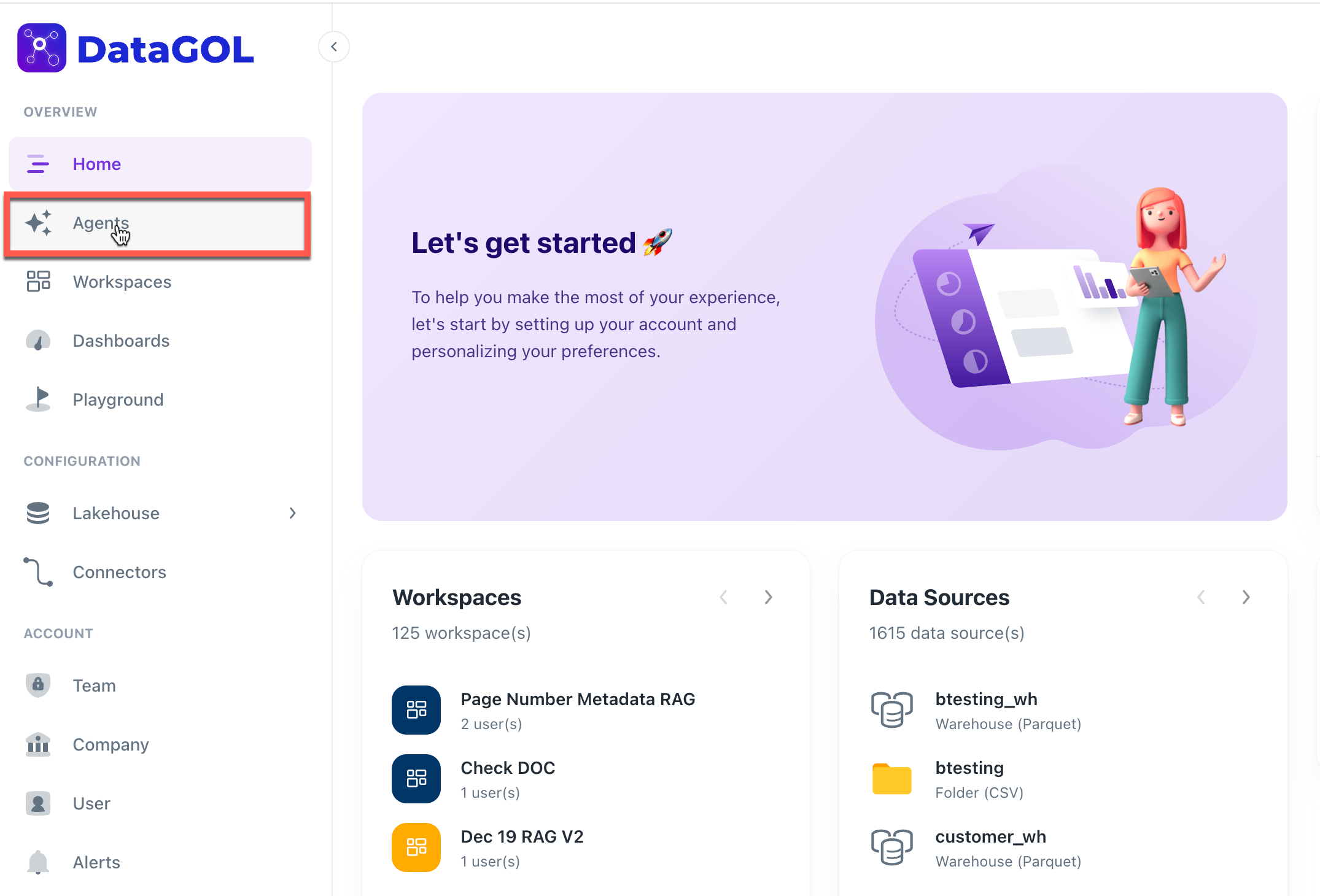
Navigate to the DataGOL Home Page.
-
Locate the Agents section in the sidebar or main dashboard and click it.
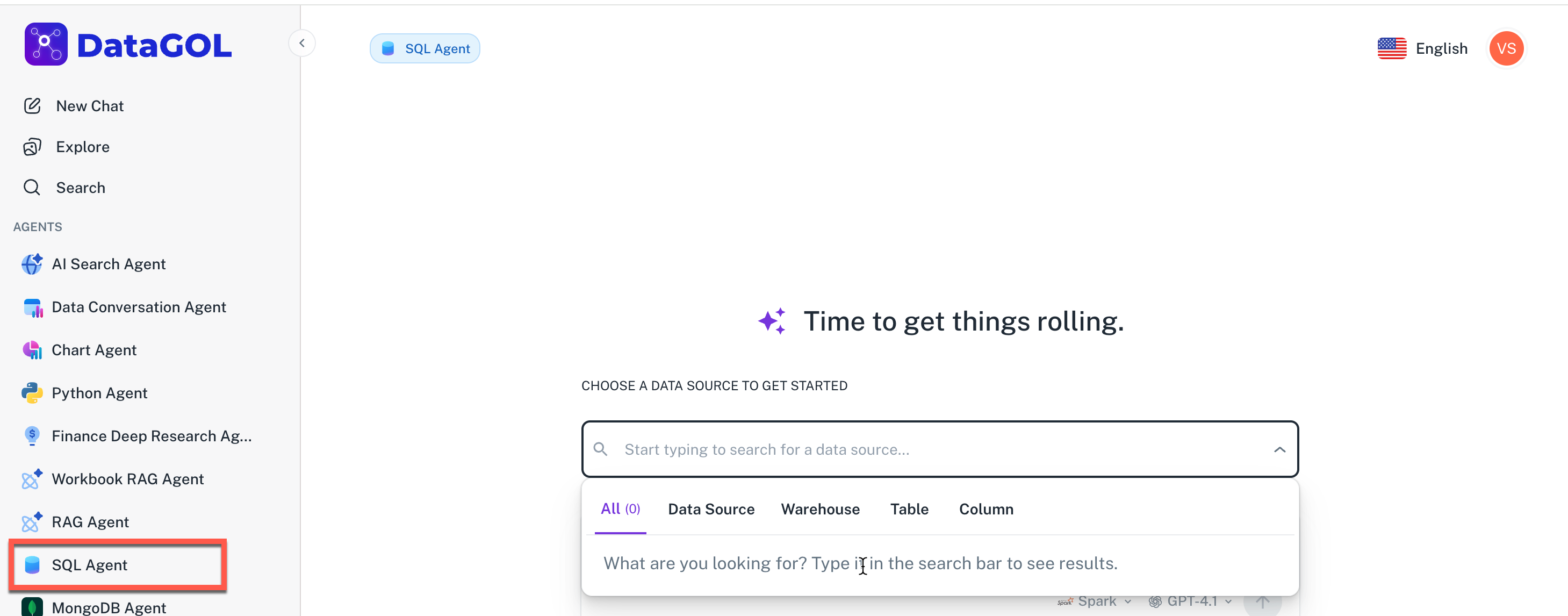
- From the list of available agents, select the SQL Agent. This specialized agent is designed to translate your natural language prompts into executable database queries.
2. Connect to the Data Source
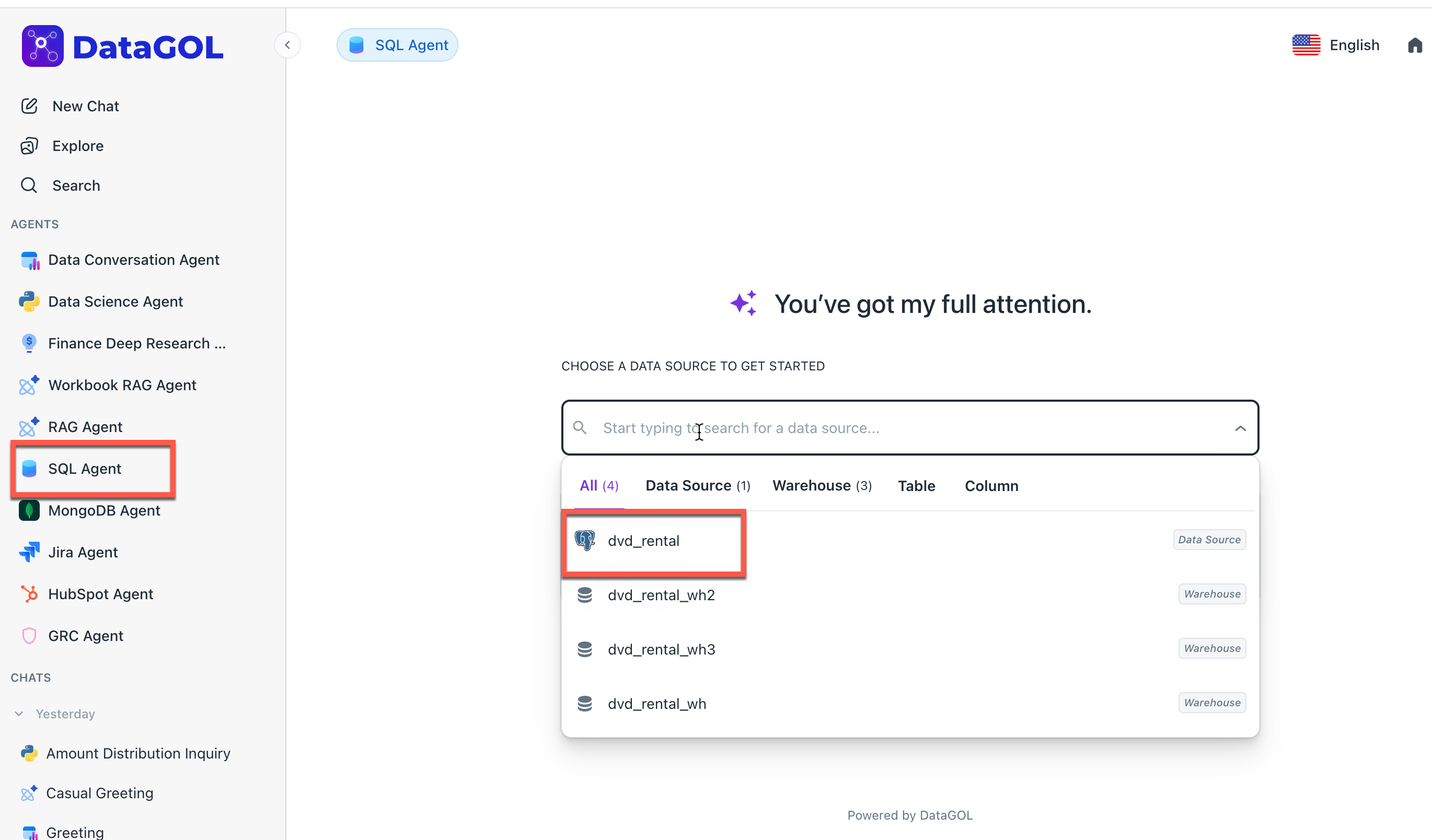
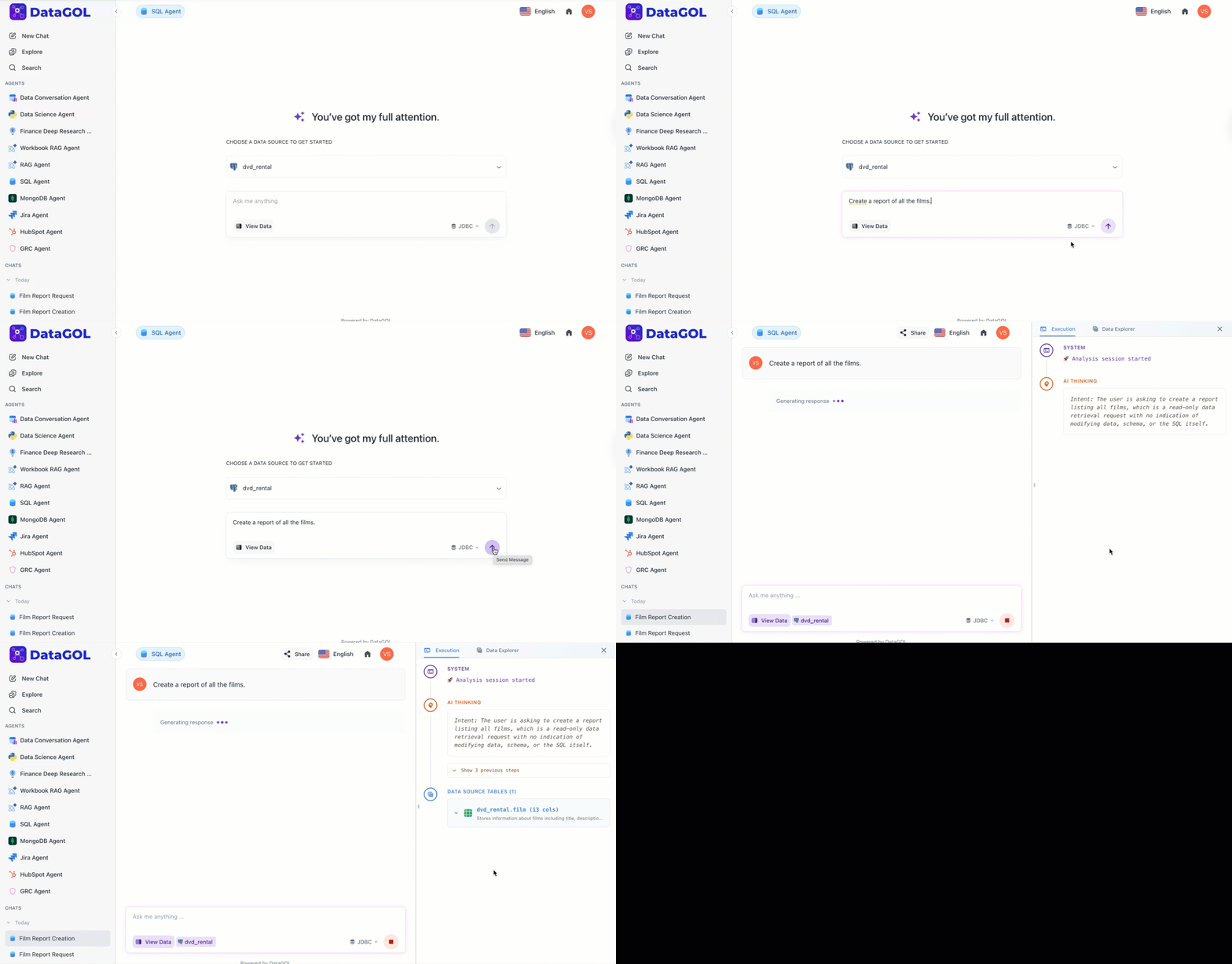
Once inside the SQL Agent interface, you will see a dropdown or selection menu for data sources. Select the dvd_rental data source. This tells the agent which schema and tables it should analyze to answer your questions.
3. Initialize the Request
The chat box is your primary interface for generating and executing queries:
-
Input your request using natural language. The agent will translate this into SQL.
-
You can run the queries directly from the SQL agent chat box once they are generated.
-
The intent of your query is determined and shown in the execution panel after you submit it.
In the prompt input box, type your initial request:
Create a report of all the films.
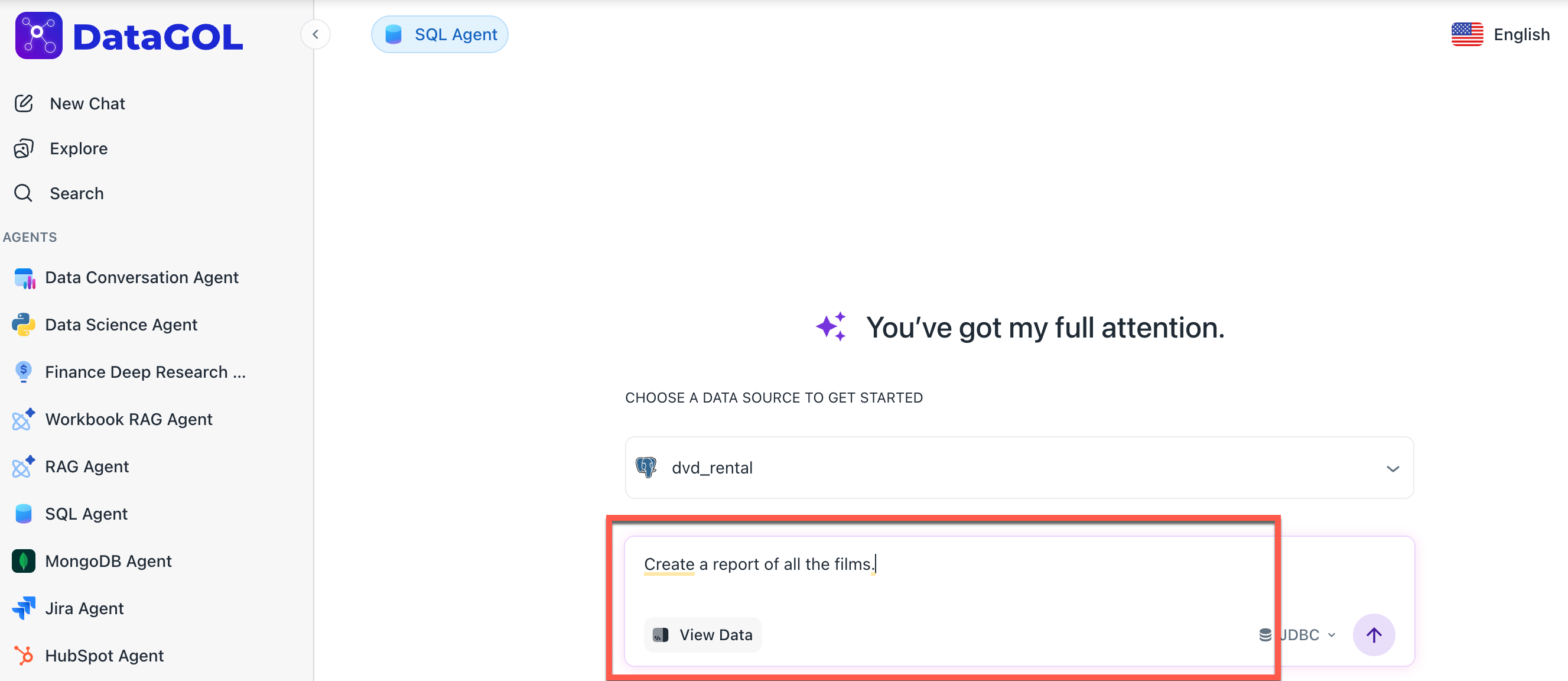
You can select a query engine of your choice; Spark or JDBC.
The SQL Agent will begin its Reasoning Phase. It analyzes the table structures (like film, category, etc.) and generates a Plan along with the necessary SQL query.
4. Execute the query
Review the generated SQL query and the execution plan provided by the agent. You can execute the query in the following ways:
Export to playground
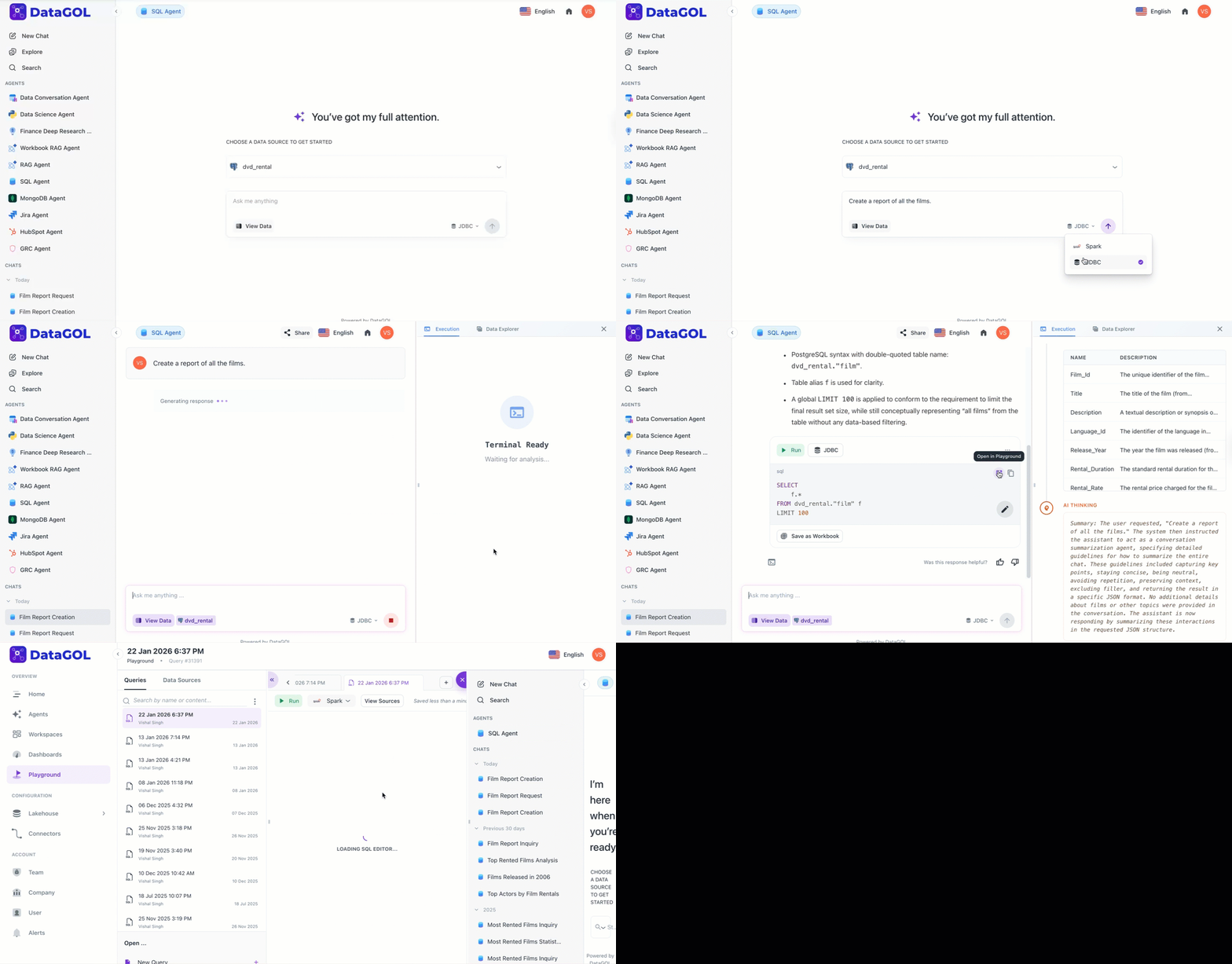
If the query requires manual adjustment or deeper integration into your workflow, click the Export to Playground option within the chat interface.
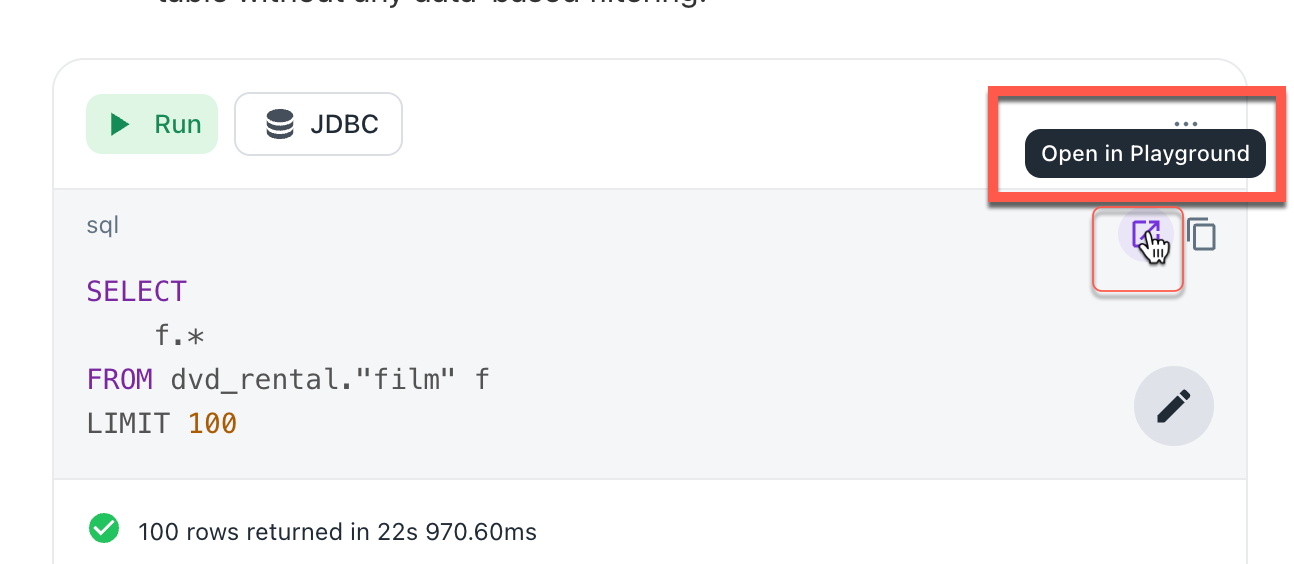
This moves your generated SQL code directly into the Playground, a dedicated environment for advanced query manipulation and data modeling.
Run query directly
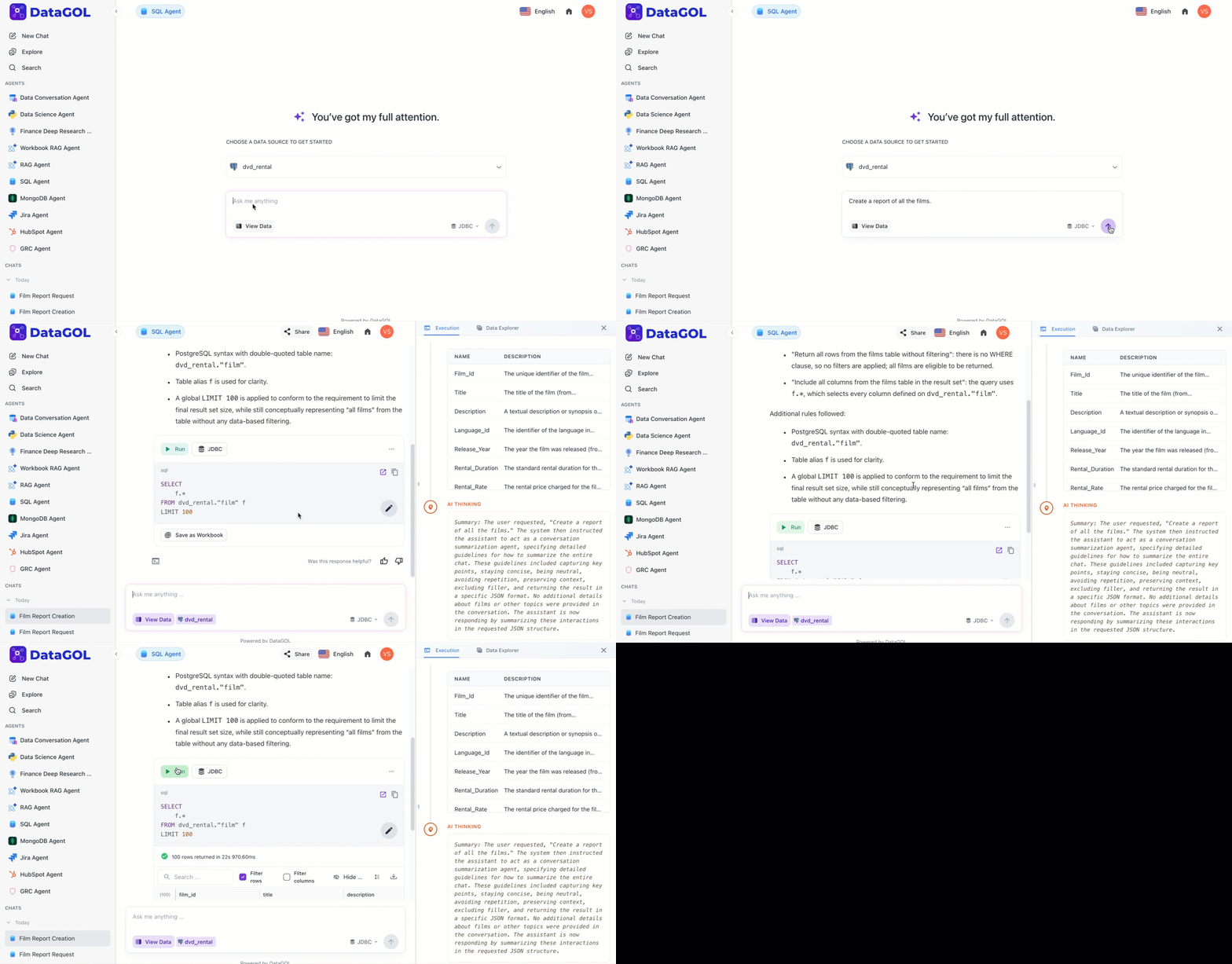
Click the Run button directly from the chat interface to view the initial results. The results will be displayed in a table format below the query editor, showing the list of films from the dvd_rental database.
Apply a follow-up filter
Apply a follow-up filter. Type the following and click Run button:
Filter the data to include only English-language films.
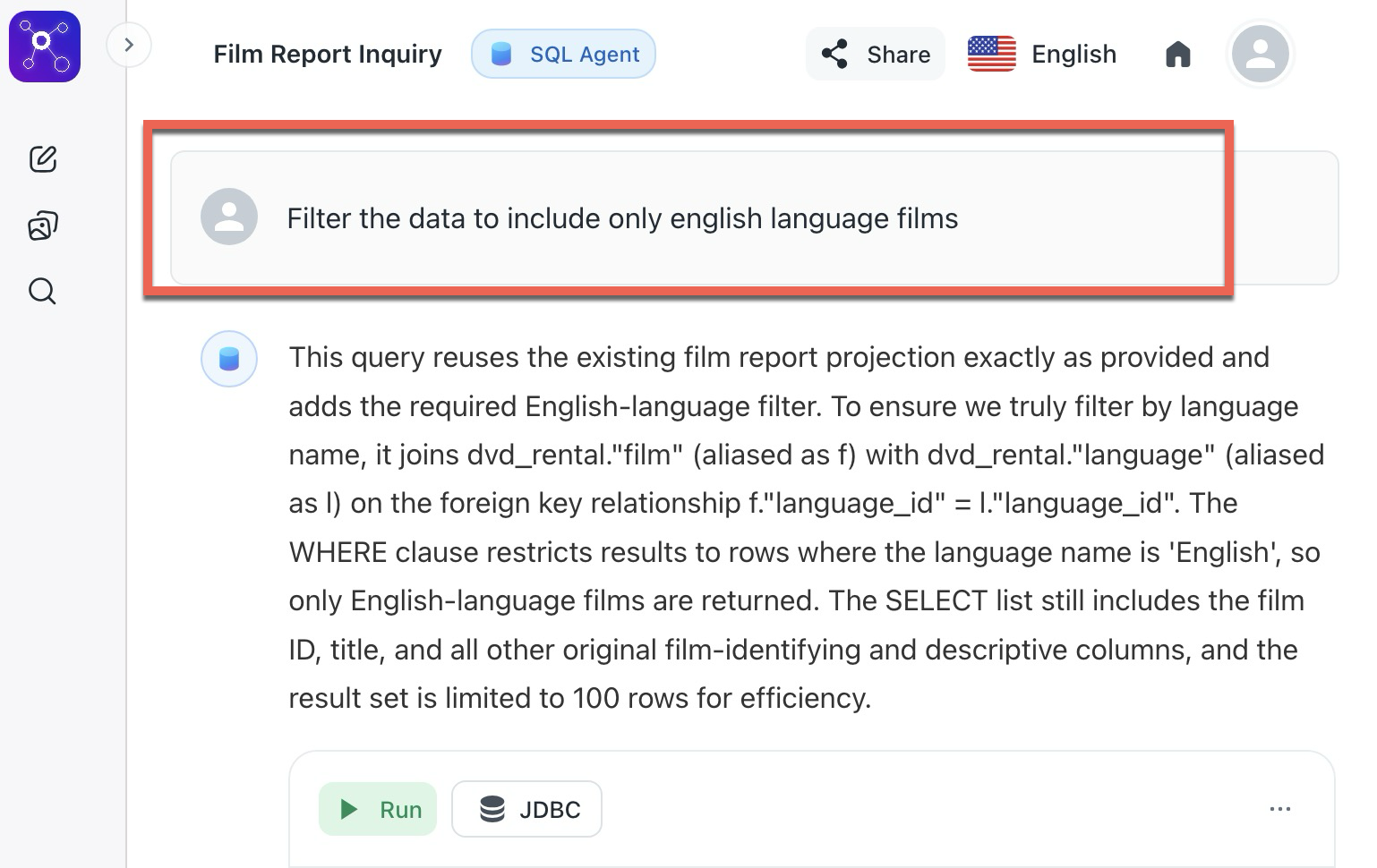
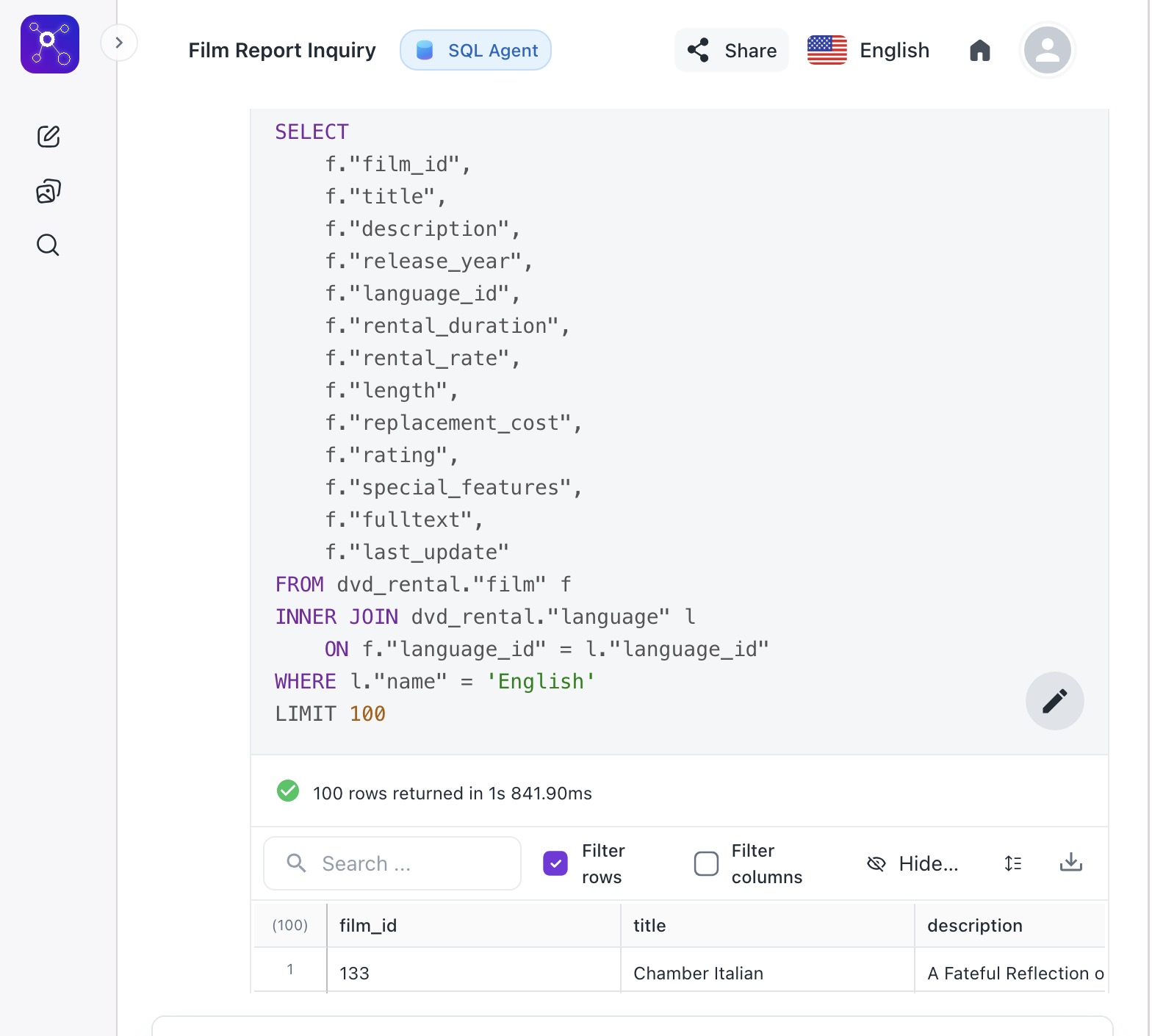
The agent updates the query automatically to include the necessary JOIN or WHERE clause for the language requirement.
The results will be displayed in a table format below the query editor, showing the list of English-language films from the dvd_rental database.
Use case 2: Autonomous merging of M&A customer data
Scenario: Your company just acquired a smaller firm. You have your Master_Customers table and their Legacy_Acquired_Users table. The column names are different, the date formats don't match, and there are duplicate records.
The Goal: The SQL Agent must autonomously create a unified, clean "Golden Record" table in the production warehouse.
1. Environmental setup and tooling
-
Connection: Connect the SQL Agent to the database metadata.
-
Tools: Provide the agent with List_Tables, Get_Schema, and Execute_SQL_Query capabilities.
2. Autonomous discovery
Instead of a human telling the agent how the tables relate, the agent performs discovery based on the prompt:
-
Schema Inspection: The agent queries the information schema to compare Master_Customers and Legacy_Acquired_Users.
-
Sample Profiling: It runs SELECT * FROM table LIMIT 5 to see actual data formats (e.g., noticing one uses MM-DD-YYYY and the other uses YYYY/MM/DD).
-
Relationship Mapping: The agent reasons that cust_id in Table A is the same as user_uuid in Table B.
3. Iterative execution
The agent begins executing the SQL commands in a staging environment:
-
Drafting: It writes a CREATE TABLE AS SELECT (CTAS) with SELECT * FROM statement.
-
Error Handling: If the SQL fails, the agent reads the error message, adjusts the SQL syntax, and self-corrects the script immediately.
4. Validation and quality assurance
The agent doesn't stop once the table is created. It must prove the data is clean:
-
Anomaly detection: It runs queries to find any remaining NULL values in primary keys.
-
Statistical check: It compares the record counts before and after to ensure no data was "lost" unexpectedly.
-
Report generation: It provides a natural language summary: I have merged 10,000 records; 450 duplicates were removed, and 12 date formats were standardized.
By leveraging the SQL Agent, you unlock the following capabilities to streamline your workflow:
| Feature | Benefit |
|---|---|
| Reasoning engine | Explains how the agent is joining tables before running the code. |
| Natural language to SQL | Removes the need to remember specific column names or syntax. |
| Iterative refinement | Allows you to build complex reports through simple conversational steps. |
| Contextual awareness | The agent remembers previous messages, so you can ask "Show me their email addresses" after a query about specific users. |
| Schema mapping | The agent automatically identifies tables and columns related to your keywords (e.g., revenue maps to the total_amount column). |
| Error correction | If a query fails, the agent usually explains why and attempts to rewrite the SQL code automatically. |
SQL agent - Chat prompt examples
Retail & E-commerce
Focus on inventory, sales trends, and customer behavior.
Which product categories had the highest profit margins last month?
Show me a list of customers who haven't made a purchase in over 90 days.
What is the current stock level for our top 5 best-selling items?
Finance & Banking
Focus on transactions, risk, and performance metrics.
What was the total volume of flagged suspicious transactions this week?
Compare this quarter's operating expenses to the same period last year.
List the top 10 accounts by total balance in the Northeast branch.
SaaS & Software
Focus on user engagement, churn, and subscriptions.
What is the average time to upgrade for users on the free trial?
How many active users logged in more than 5 times in the last 14 days?
Show me the monthly recurring revenue (MRR) growth trend for 2025.
Tips for crafting your natural language prompt in SQL agent
In the chat box, describe the data you need as if you were speaking to a colleague.
-
Be specific: Instead of Show sales, try Show total sales by region for the last quarter.
-
Mention filters: Include dates, categories, or specific metrics you care about.
-
Type your question just as you would ask a colleague.
- Instead of: SELECT revenue **FROM sales WHERE date > '2023-01-01' Simply ask: What was our total revenue for the last year?
-
Mentioning timeframes (e.g., "this month," "Q3") helps the agent filter accurately.
-
Ask for visuals: You can say, "Show me a list of my top 10 customers" or "Summarize the average order value."
Was this helpful?